Production Accounting Software Comparison: Which System Has the Best Cost Reporting?
Your cost report is your lifeline, whether you're prepping a new show or racing toward a wrap. The moment a studio calls for numbers, you need to trust what's in front of you. But not all entertainment accounting software handles that data the same way.
"GreenSlate has hands down the best cost reporting module I've ever used." — D.R., Production Accountant/Controller
Let's break down how the big three handle cost reporting: GreenSlate, Entertainment Partners (SmartAccounting), and Cast & Crew (PSL+).
📊 Cost Reporting at a Glance
Before we dive into the weeds, here is a quick bird's-eye view of how these systems stack up on the day-to-day features that matter most:
|
Cost Reporting Feature
|
GreenSlate
|
Entertainment Partners (EP)
|
Cast & Crew
(PSL+)
|
|
Data Access
|
Nothing to sync.
It's all one system.
|
Cost syncs in from separate modules.
|
Cost syncs in from separate modules.
|
|
Real-time edits
|
Real-time grid catches errors before you post.
|
Edit report required before posting.
|
Edit report required before posting.
|
|
Studio COA Mapping
|
Studio COAs map with matching from templates within the application.
|
Setup in auxiliary tool, some automated matching.
|
Single COA only; ERP mapping may require third-party middleware.
|
|
Expense documentation
|
All backup, including the PO, in one doc per transaction.
|
Backup spread across applications, requiring multiple logins.
|
No native backup; attachments not linked to transactions.
|
|
Pricing Setup
|
All-inclusive base pricing
|
Extra fees may apply for extended tools.
|
Additional fees may apply as a percentage of payroll.
|
The Reality of Legacy Systems vs. True Cloud Power
EP and C&C are powerful legacy databases, well known to traditional studio corporate finance teams. But they often require you to manually sync data across modules or run background imports just to see your latest numbers. Bouncing between separate apps and waiting on batch posting is friction you feel every single day.
One longtime production accountant summed up years of frustration with EP's reporting this way: the cost report only runs by period instead of by date, a limitation flagged for fixes going back "10 years ago, 5 years ago, last year" without ever changing. Her verdict: "It's still a mess."
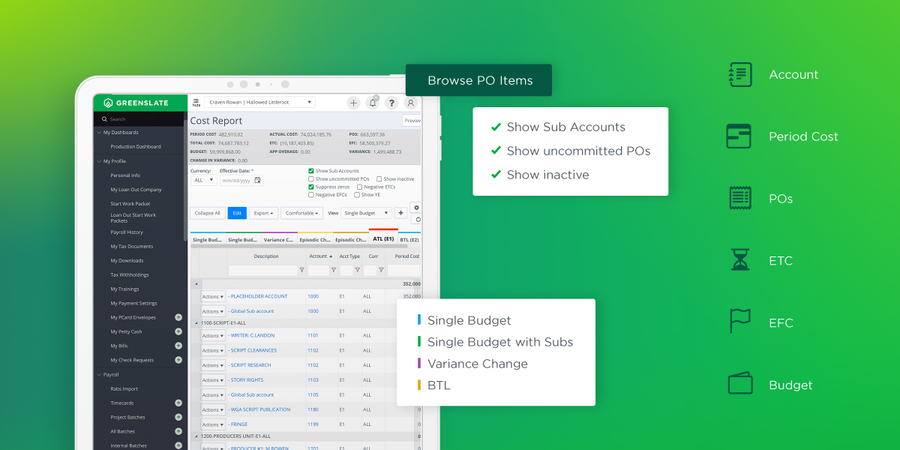
The GreenSlate difference: We built our platform natively in the cloud with a single, centralized database. When a digital timecard is posted or an invoice is processed, it updates instantly. No waiting. Your cost report reflects your actual financial reality in real time.
Map Your Chart of Accounts in a Fraction of the Time
If you've ever lost hours manually re-mapping a studio's specific Chart of Accounts (COA) for a new project, you know how soul-crushing that task can be.
EP and C&C both require setup that's manual and localized to each project. You have to build out templates or adjust settings project by project to match strict corporate guidelines.
How GreenSlate handles it: Our COA Mapper includes pre-loaded corporate profiles for major streaming networks, so you can map your accounts in a fraction of the time.
Tracking Commitments and Audits Seamlessly
With legacy software, tracking purchase orders alongside actuals often means cross-referencing different modules. When a studio auditor asks to see a receipt from three weeks ago, you're usually digging through separate digital folders or paper binders to find the backup.
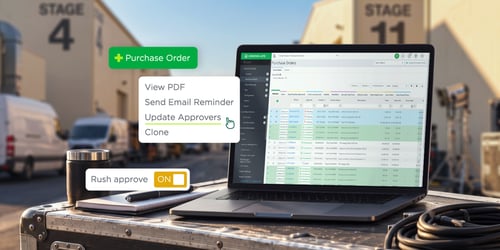
With GreenSlate, the purchase order module is built right in, with a dedicated "commit" step to verify your numbers before they hit the report. Everything is paperless. Invoices, timecards, and receipts attach directly to the specific line item. If an auditor has a question, you can pull up the exact backup document with a single click.
One accountant, seeing GreenSlate's cost report drill down into timecards and purchase orders for the first time, called it "my 20-year accounting dream in the making."
— L.B., Accountant
Phantom Fees Shouldn't Haunt Your Budget
GreenSlate’s pricing is simple and transparent. Advanced reporting is included in our all-in-one platform, with no modular add-ons. Native dashboards let you switch between shows and run cross-show comparisons right out of the box.
Ready for a Smarter Way to Report?
You shouldn't have to fight your software just to find out if you are on budget.
If you are tired of background syncing and messy data exports, we would love to show you how clean and painless your cost reporting can actually be.
We also subtracted. Legacy payroll report, ACH, and check-printing settings were retired, and the whole platform got faster for it. A recipient-count display on system emails was removed after it was identified as a platform-wide drag. A Start Date column came off the Employee Positions grid to speed up the grid. Roughly one in five items on this list was a removal rather than an addition.
Ready to stop guessing and start reporting with confidence? See real-time cost reporting in action on your next show: schedule a custom GreenSlate demo.
 Login
Login






 Login
Login